
Initial Values Shape
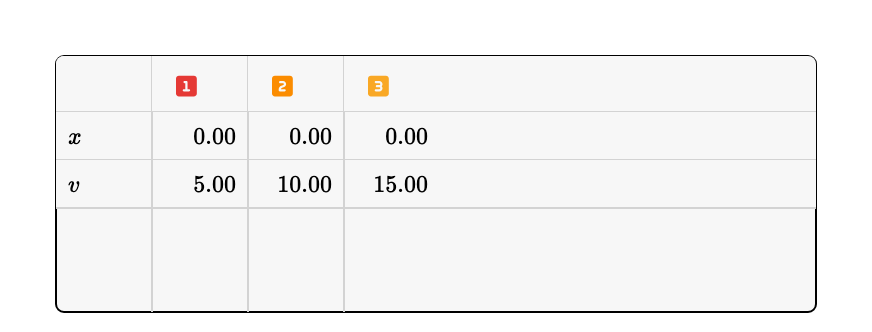
The Initial Values shape lists the input terms of your model — the starting values of differential equations and user-adjustable parameters — as an editable table, with one column per case.
Overview
Every term that accepts user input — the state variables of differential equations and recurrences, and parameters without a defining expression — appears as a row. The rows always follow the model: every time the expressions are re-read, terms that appeared are added and terms that are gone are dropped. Editing a cell changes the value the term starts from when the model runs. When the model defines more than one case, the table shows one value column per case, making it easy to compare scenarios side by side.
The state variables come first and the parameters after them, with a discreet line marking where one block ends and the other begins. Columns can be made wider or narrower by dragging the line between them: on the case header when the model has more than one case, and on any term row when it has only one.
Adding the Shape
Open the table button in the top toolbar and choose Initial Values, then click and drag on the board to draw it. The table starts with a row for each input term currently defined in the model.
Toolbar
The Initial Values toolbar provides:
- Colors — Background and border colors
- Scenarios — Choose which cases are shown, when the model defines more than one. The button is hidden while the model has a single case.
- Add Moment — Add a group of values at a later iteration
- Delete — Remove the shape from the board
Editing Values
- Click a value cell and type a number. The model recalculates immediately with the new starting value.
- Values are rounded to the model's precision setting.
Moments
Besides its starting value, a term can be given a value at a later iteration — for example to model an impulse or a sudden change. Those iterations appear as moments: a colored row naming the instant, followed by the terms that take a value there.
- Click the button in the shape toolbar to add a moment. It starts with every term of the table
- Enter the value each term should take at that moment
- Edit the value on the moment row itself to move the whole moment to another instant
A moment holds only the terms you keep in it, so different moments can carry different terms:
- Select a term row inside a moment and use the button to drop that term from that moment. Its value there is discarded and the term simply keeps whatever the model computes
- Select the moment row and use the button to put a term back. The menu lists the terms missing from that moment, and the new row starts from the value the model computed at that instant
- Select a term row and use the button to swap it for one of the terms the moment is missing. The values you typed move to the new term, so a row entered against the wrong term can be corrected without retyping
- Dropping the last term of a moment removes the moment. Selecting the moment row and using removes it in one step
The first group is the model's own starting values, so it always lists every term and its rows cannot be dropped.
A moment only reaches the run through the instant it opens, so changing one the model has already run past — a value typed into it, a term added, dropped or swapped, the moment moved or removed — stops the model and takes it back to the first moment. The next run reads the moment as it now stands.
Cases
A model can run up to 9 cases in parallel, each with its own initial values. Set the number of cases from the independent variable menu in the player toolbar (click the variable name, e.g. t, and change Cases). With more than one case, the Initial Values table shows one column per case, and each column is edited independently. Every case is shown until you pick the ones you want in the Scenarios menu of the toolbar; after that the table keeps your choice, and cases added later are not shown automatically.
Copying Data
The shape's copy menu can copy the table as CSV, with one column per case, ready to paste into a spreadsheet.