
Notebook
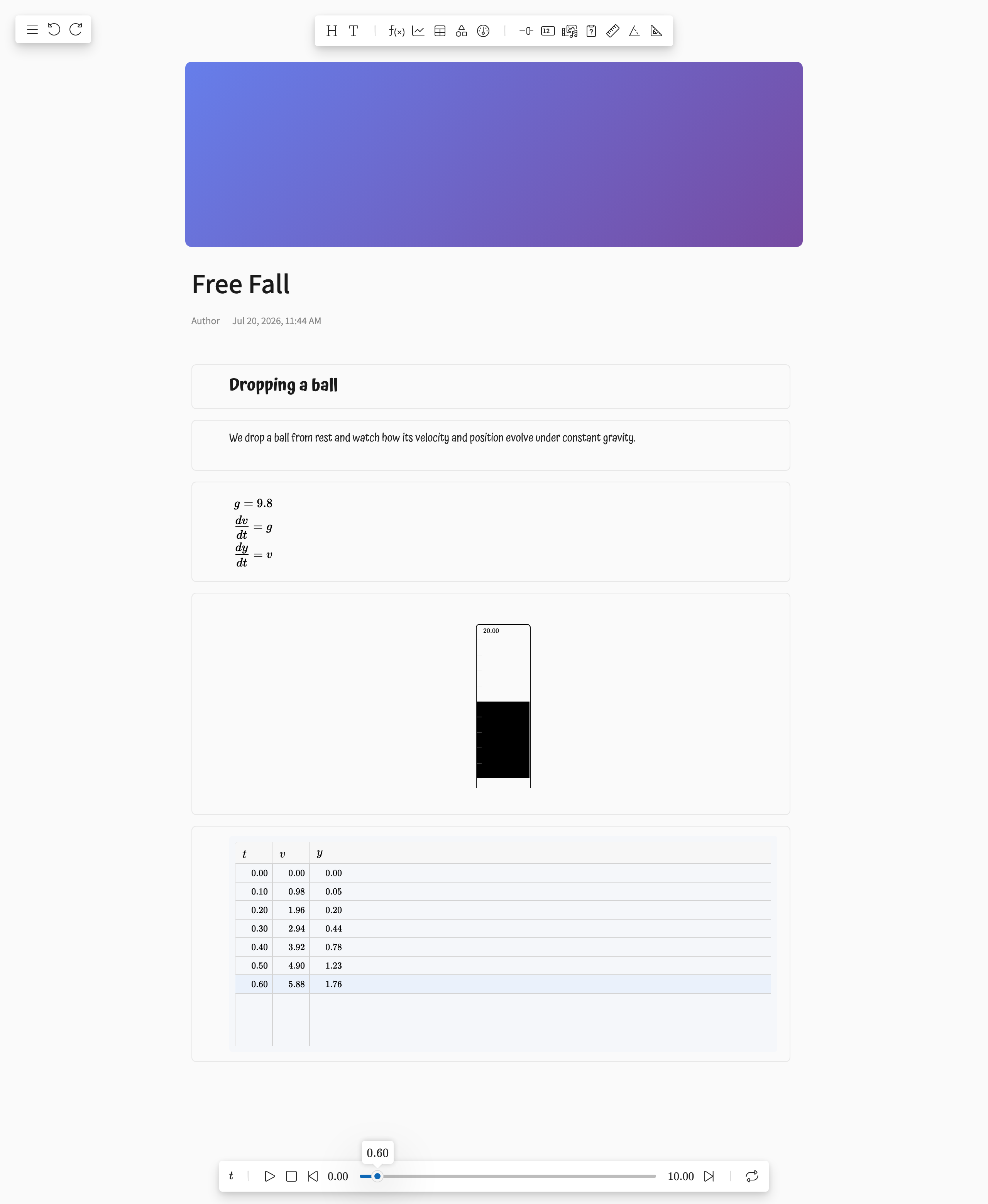
A Notebook is a document-style Modellus model. Instead of placing shapes freely on a board, you write a vertical sequence of blocks — headings, text, expressions, charts, tables, sliders, and media — like an interactive lab report or worksheet.
Overview
Notebooks share the same calculation engine as the Board editor. Expression blocks define the mathematics of the model — using the same expression language as the Expression shape — and the remaining blocks display and control it. A notebook combines narrative (headings, text, images) with a live, playable simulation.
Every notebook has a header with a cover image, a title, the author name, and the date it was last modified. Click the cover image to upload a new one, and click the title to edit it.
Creating and Opening Notebooks
Notebooks are created from the Catalog page: click Create Notebook in the sidebar. Notebooks appear alongside board models on Catalog cards, marked with a notebook icon, and open in the notebook editor rather than the board editor.
Blocks
Content is added as blocks from the top toolbar. Each button appends a new block at the end of the notebook.
| Block | Icon | Description |
|---|---|---|
| Header | A large heading for structuring the document | |
| Text | A paragraph of text for explanations and narrative | |
| Expression | A mathematical expression that is parsed into the model, exactly like the Expression shape | |
| Chart | Plots terms of the model as the simulation runs, like the Chart shape | |
| Table | Displays term values per iteration, like the Table shape | |
| Simulation | Embedded simulation area (in development) | |
| Gauge | Circular dial for a term (in development) | |
| Slider | Interactive slider to adjust a value | |
| Value | Numeric readout of a term (in development) | |
| Media | An image embedded in the document | |
| Question | Assessment question (in development) | |
| Ruler | A scale to measure against, read linearly or over decades. The ruler object itself, in a block of its own | |
| Protractor | A band of degrees to measure an angle against, markable in degrees, radians or turns. The protractor object itself, in a block of its own | |
| Slope | Slope measurement tool (in development) |
Working with Blocks
- Select — Click a block to select it. A context toolbar appears below the block with its specific options (terms to display, colors, and more).
- Reorder — Use the grip handle on the left edge of a block to drag it to a new position. The context toolbar also offers move actions.
- Style — Every block has a background color and a border color, available from the color button on its context toolbar.
- Duplicate, copy, and paste — Blocks can be duplicated in place or copied to the clipboard and pasted after another block.
- Delete — Remove a block from its context toolbar, or select it and press Delete.
- Undo / redo — Adding, removing, moving, and editing blocks is undoable with the toolbar buttons or Ctrl+Z / Ctrl+Y (Cmd on macOS).
Running the Model

The player toolbar at the bottom of the notebook drives the simulation, just as in the board editor:
- Independent variable — Click the variable name (e.g. t) to rename it.
- Start / Step — Click the start value to set the domain start and the iteration step.
- End — Click the end value to set where the simulation stops.
- Playback — Play/pause, stop, step backward/forward, and replay buttons, plus a playhead slider to scrub through iterations.
Chart, table, and slider blocks update live while the model plays.
Saving and Collaboration
- Notebooks are saved to your account from the menu. Only the notebook's owner can save changes.
- When a notebook you own is open, edits are synchronized in real time, so collaborators viewing the same notebook see changes as they happen.
- The cover image is uploaded as the notebook's thumbnail when you save.
File Format
A notebook is stored like any other model, with an additional top-level notebook section in the model definition:
{
  "properties": { ... },
  "notebook": {
    "title": "Free Fall Lab",
    "author": "Author",
    "blocks": [
      { "id": 1, "type": "header", "content": "Free fall" },
      { "id": 2, "type": "text", "content": "We model a falling object..." },
      { "id": 3, "type": "expression", "content": "\\frac{dy}{dt}=v" }
    ]
  }
}
Each block carries an id, a type, its content, and styling properties such as backgroundColor and borderColor. See the Model Schema for the full model format.